3D Touch Preview API#2186
Conversation


|
This is awesome! |

 eliperkins
left a comment
eliperkins
left a comment
eliperkins
left a comment
There was a problem hiding this comment.
So, as I understand it, we need to have already rendered our previewView somewhere in React, since we need to pass along the node handle in passProps? How will this work with cases where we want to preview a different view than one we already have rendered (say, a new view controller)?
| - (void)setStyleOnInit; | ||
| - (void)updateStyle; | ||
| - (void)setNavBarVisibilityChange:(BOOL)animated; | ||
| - (void)setPreviewController:(RCCViewController *)controller; |
There was a problem hiding this comment.
This should be implemented as a @property, rather than explicit getters and setters with private ivars.
|
|
||
| NSString *previewViewID = passProps[@"previewViewID"]; | ||
| if (previewViewID) { | ||
| RCCViewController *topViewController = ((RCCViewController*)self.topViewController); |
There was a problem hiding this comment.
This seems a little scary. Do we have a way to guarantee that this view controller will be a RCCViewController? Perhaps we should wrap this cast with a check to see if the view controller responds to the specific selector that we're calling on it (@selector(setPreviewController:)).
There was a problem hiding this comment.
Yes you're right, in the if(keepStyleAcrossPushBool) statement above it is actually doing an if ([self.topViewController isKindOfClass:[RCCViewController class]]).
I will incorporate this, which one would you prefer?
There was a problem hiding this comment.
Either isKindOfClass or respondsToSelector is fine with me!

Thank you for the feedback!
I like to think of it as a different way to |


|
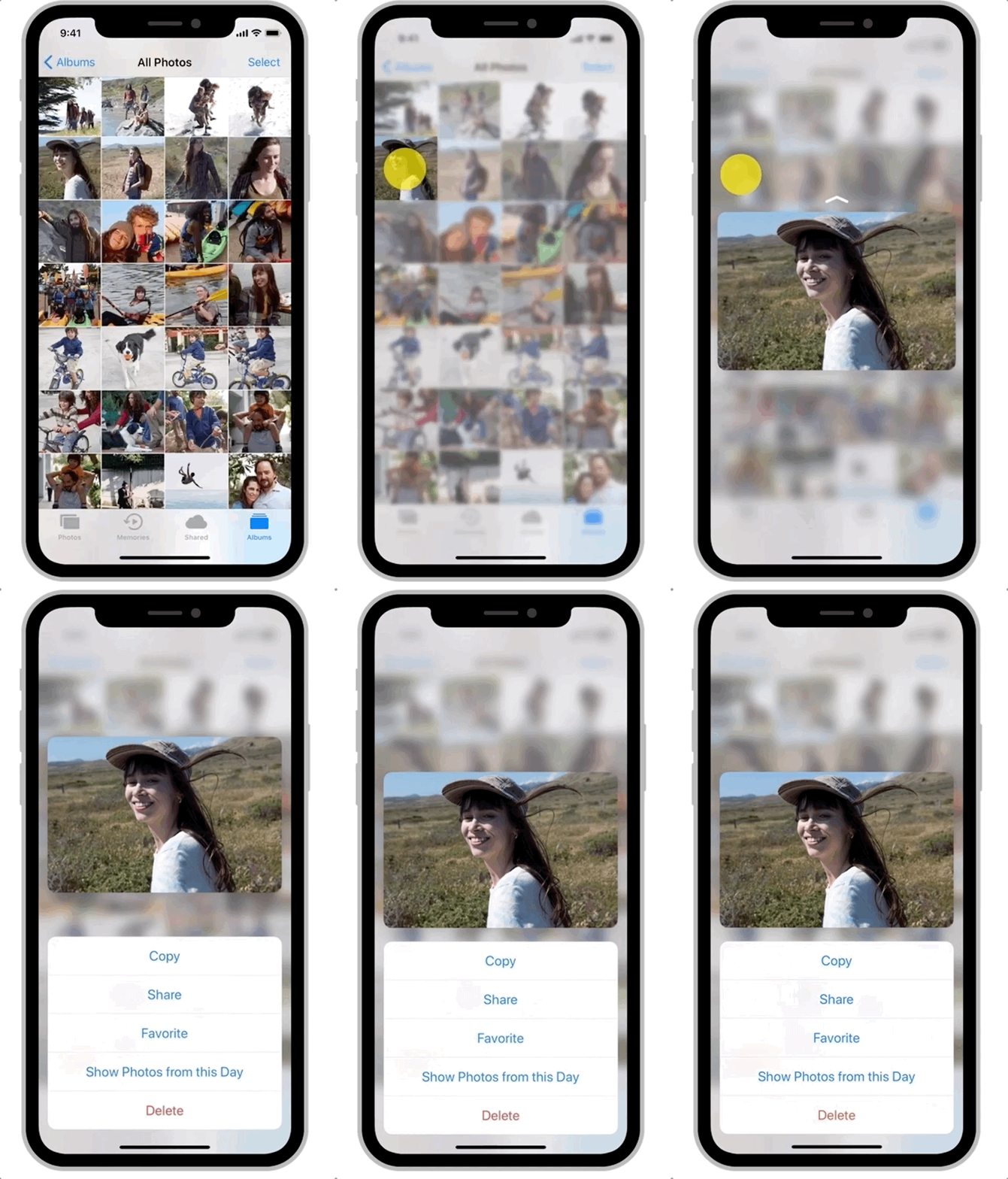
Awesome! API love would be great. Also add support for action buttons:
|
|
Yes, that is what the Preview component would just do behind the scene (get the ref etc.) It must be rendered before the force touch is started. Actions is good and easy addon, but providing extensive api for it would require some work (like click action and show another set of actions) Example of this is in the Apollo app, force press an item, click share, and you will be promted with another set of actions (share image / share link to image) |
…feature/preview-peek-pop
…tive-navigation into feature/preview-peek-pop
I am actually thinking about moving away from providing specific component that will act as previewViewID. The preview view component is only used to create and measure a rectangle on the screen to not blur on force press. We could remove the need for providing the actual react id and just provide the ref by handling What do you think? |
|
+1 on handling |
|
Ok. Then I think we are good to go, at least to begin with. We could iterate on this if we get some feedback from people. |

| const screenInstanceID = _.uniqueId('screenInstanceID'); | ||
| if (params.previewView instanceof Component) { | ||
| previewViewID = findNodeHandle(params.previewView) | ||
| } |

There was a problem hiding this comment.
I think it should have an else branch to treat previewView as previewViewID directly?

|
Looking great! Did you test this two cases:
|
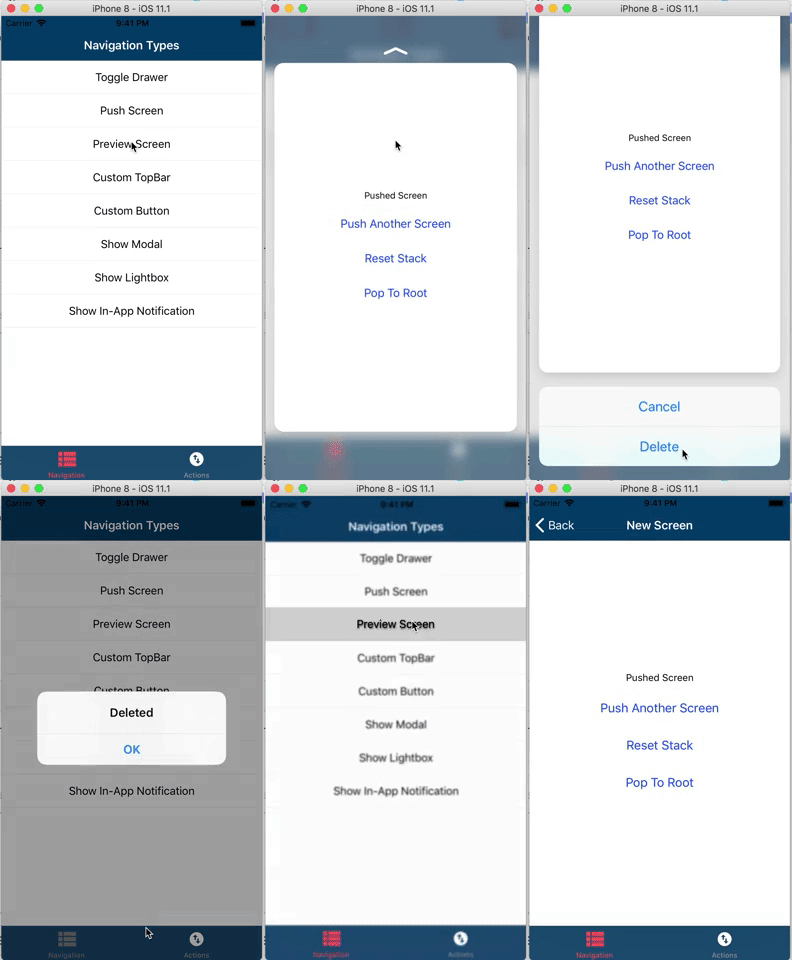
With our current implementation we can replicate every app I've seen yet that has this feature. Only limitation is the preview height (Like the image preview), but once we implement showLightbox, the preview controller should be able to use that height. Also we need to implement a configurable boolean flag to skip the actual push on hard press. Does this make sense to you? |
|
Ok after reading your second point again I realized that this could actually be done, but as to my understanding we don't have any easy way to update props of an RCCViewController yet? But it should be easy to check if the previewController is is the same as the proposed one and just re-use it and update its styles and props. |

| } | ||
|
|
||
| - (void)previewingContext:(id<UIViewControllerPreviewing>)previewingContext commitViewController:(UIViewController *)viewControllerToCommit { | ||
| [self.navigationController pushViewController:self.previewController animated:false]; |
There was a problem hiding this comment.
Here we may want to provide the user to skip this operation if he doesn't want the screen to be pushed.
Ok sorry, I had misunderstood the API. I thought So I'll rephrase my question. Let's suppose this use case: While you force touch on Instagram (peek), it shows a minimal preview screen with just 3 components: the profile photo, the profile name and the photo. When you finish force touching (pop), it shows the full page with all other contents (follow button, like button, etc). Is this case supported? 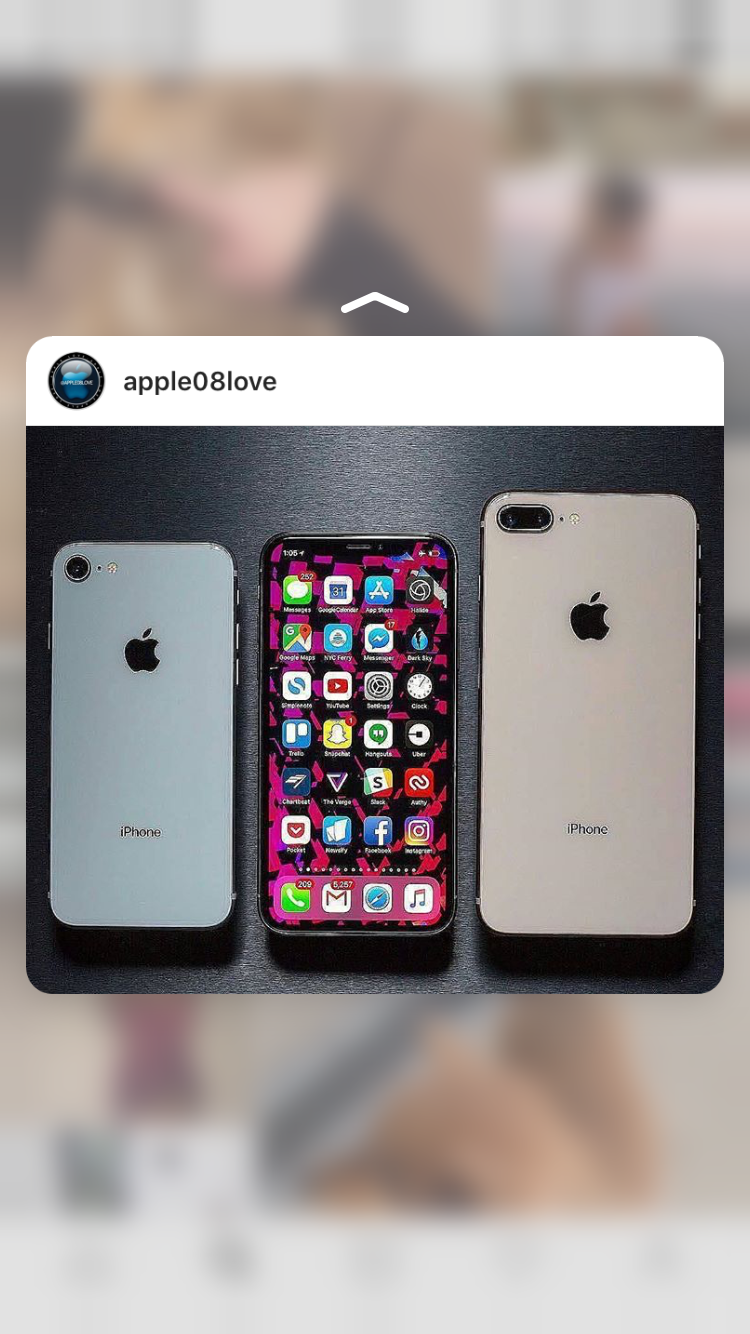
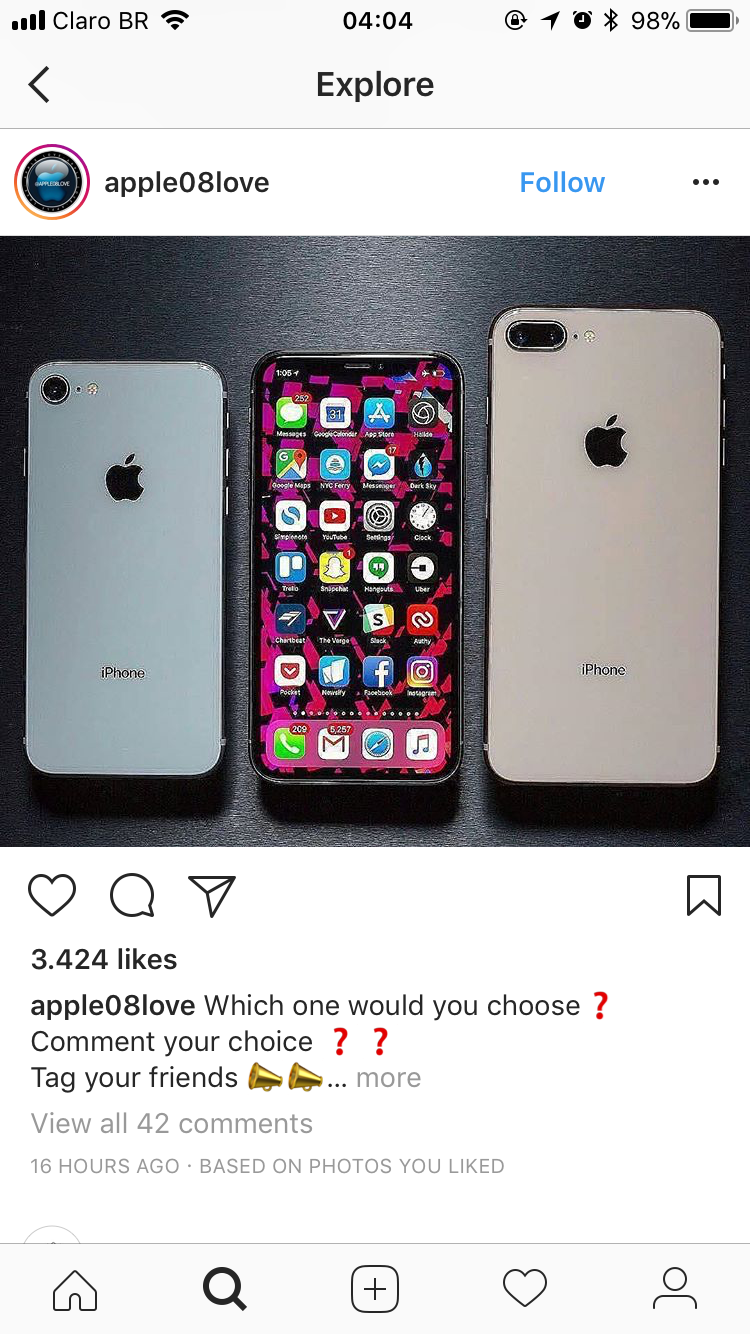
If not, one possible solution is to pass a prop to the screen saying if it's on the peek/preview state or not. Another way would be by using events (might be boring to always have to listen to it and set the state accordingly, on the other hand it's more flexible as the prop name is not fixed). |
|
Gotcha! No problem. We can pass a prop saying it's a preview and then send ScreenChanged event once it's pushed (didPreview etc.) For the instagram case, what is really happening is just cropping + conditional rendering. How they do the height thing, IDK. Maybe it would just work by setting fixed height to the first View inside the screen. I will verify and come back to you. |
|
Allright guys, I have tested all cases discussed in the thread. I added the option conditionally commit to pop the controller and to set explicit height to the preview with the recommended Please let me know if you have any more concerns about this PR, I'd like to get it merged to get some feedback from real users and see if anybody will find an limitation with the current implementation. |

|
@birkir - This is really awesome. Thank you for your work on this. However, like @enahum I'm seeing the |
|
@birkir - Does the |
|
@birkir - so I’ve been playing around with this new functionality and it’s super easy to use. One thing that would be nice to have is a prop that goes true when a preview has been committed. I’m currently listening for the event, which works as expected, but if I want to conditionally block rendering of a component when in preview mode, I need to tract state for when a preview gets committed. Not a huge deal but this could be a small improvement that makes use even easier. |
Yep that's exactly what I meant with:
|
|
@brunolemos - Can you explain what you mean? |
|
@rgoldiez I meant: "+1" |
|
Cool thanks for the feedback guys. Can we update screen props somehow dynamically? I don't think this is done anywhere in RNN at the moment. I know it's a hassle to add a listener and a state mechanism, but it's very common pattern with RNN in general (didAppear+didDisappear). |
* master: (22 commits) setTabButton to change the label of the TabButton (wix#2215) 3D Touch Preview API (wix#2186) Update android-specific-use-cases.md Update android-specific-use-cases.md Load props from props registry for redux screens Nav bar save props (wix#2211) Support passing unserializable props to custom navBar component Save buttons props for root screens Ensure that styles set on individual buttons are not overridden (wix#2200) Update top-level-api.md (Android) Allow disableOpenGesture right or left in the drawer (wix#2189) Revert "Support iOS 11 prefersLargeTitles #1643 (wix#2090)" (wix#2204) Support iOS 11 prefersLargeTitles #1643 (wix#2090) Support passing unserializable props to custom button (wix#2192) addOnNavigatorEvent improvements (wix#2175) Fix missing props (wix#2179) Revert "Don't custom button props over the bridge (wix#2174)" (wix#2177) Don't custom button props over the bridge (wix#2174) Set missing TopBar background color Register multiple navigatorEventListeners (wix#2173) ...

|
@birkir lets say I have a list of components that onLongPress will do the 3D touch peek&pop and it looks like is working, while doing the peek I can see how it sometimes shows me a peek with the props that I've passed to a previews peek. for instance: have you or anyone else seen this? |
|
from the logs first preview = OK |
|
Thanks. It seems that If you do a peek and then cancel quickly, the next peeking screen will actually be the top view controller and I think that is what is happening for you. I will need some help debugging why this is happening, as apple says that the previewing api will handle deallocating the previewing view controller, but doesn't seem to be the case. Maybe it would work to simply set the previewController to nil after successful push. I'll investigate but any help would be greatly appreciated. |
|
I really don't know much about object-C but I was looking at the docs and I'm wondering if you ever do |
|
an example of how to use it https://github.com/alexhillc/AXPhotoViewer/blob/master/Example/AXPhotoViewerExample/TableViewController.swift#L62 dunno if this helps |
|
Yes, Apple's docs say:
https://developer.apple.com/documentation/uikit/uiviewcontroller/1621395-unregisterforpreviewing But yes, we may have to call it manually. |

|
@messense Did you run preview with FlatList? I have same issue. With single page its ok. |
|
@niktonic21 Yes, I did run preview with |
|
@messense @niktonic21 We are still waiting for the fix to be merged. It is ready! |

|
Hey guys, sorry about the delay. Merged now, please ping me on discord if I'm not responsive here 👍 |

Add the preview and pop feature
To use the feature you simply call `navigator.push()` but with additional parameter `previewViewID` which is a React Node.
```js
<TouchableOpacity
  onPressIn={() => this.props.navigator.push({
    screen: 'screenid',
    previewView: this.viewRef,
    previewActions: [{
      title: 'Foo',
      style: 'selected', // none, selected, destructive
      actions: [{ title: 'Bar' }],
    }],
 })
/>
```
Add the preview and pop feature

To use the feature you simply call `navigator.push()` but with additional parameter `previewViewID` which is a React Node.

```js
<TouchableOpacity
  onPressIn={() => this.props.navigator.push({
    screen: 'screenid',
    previewView: this.viewRef,
    previewActions: [{
      title: 'Foo',
      style: 'selected', // none, selected, destructive
      actions: [{ title: 'Bar' }],
    }],
 })
/>
```

|
Hello, does anybody have a working example of this preview 3d touch feature? |

|
Hi, I'm seeing a weird case. if you peek a view several times (without popping it), and then you actually decide to pop a view, it will do the animation, but it won't show the new view. Even if you just press the view, it won't go to the "details" view. |
|
@charliesbox I face the same issue. After this issue persists, onPress doesn't get fired at all. So, I can't access the detail page as shown below: |

|
@charliesbox Can you also add my gif animation to the issue? |
|
@anonrig sure thing 👍 |

|
What happened with this guys? |

|
What happened with this? |
13 participants


Added the preview and pop feature.
It is currently implemented so the javascript API is untouched (uses passProps) but I would like to see if anyone has interest in this feature so we can give it some API love.
To use the feature you simply call
navigator.push()but with additional parameterpreviewViewIDwhich is a React Node.Going forward with this would include some of the next steps: